Sunday, January 27, 2008

S-Plus Slots

I decided to mess around with another IGT machine called the "S-Plus (S+)". This machine is strictly a mechanical slot machine with no real video.

The hardware is similar to the PE+ machine but lacks video and contains optics for the reels.

There is a bunch of 7-segment display for some form of output, and interesting navigation procedures to view various operator values.

Once I got a skeleton driver working, I started to hookup the inputs and the 7-segment displays. After much work, I finally got the display to show the first error code. This is an error 61 or "Bad CMOS RAM". Sound familiar? It should, the PE+ generates this error the first time you boot the machine with empty RAM and empty EEPROM data. When I saw this error code come up, I knew I was on the right track.

The proper procedure to recover from this error is to open the door and press the Self-Test button. After doing that, the follow error code appears. This is an error 61-1 which represents "Game Data Reset". What needs to be done at this point is to close the door and turn the jackpot reset key.

Doing that produces the next error code, 65-3 which is "Game Options & Meters Not in the Most Current Format". This can be corrected with a Set Chip, or you can just turn the jackpot reset key and have it overwritten.


I chose to allow the machine to overwrite the values and turned the jackpot reset key. A new display appears with the "0" flashing as the CMOS data is reloaded. Now the next error code appears, 65-1 or "Bad EEPROM Data". Once again a error message I've seen on the PE+ machine. To resolve this you must open the door and press the self-test button.

Finally, the last screen appears which should be error free, however I get the following code, 41 which says "Reel 1 Tilt". This means the machine was unable to process the first reel properly.

So this is where I'm currently at today. From this screen I can go into all the operator self-test screens and play around with the machine settings and listen to the built-in sounds, but I get held up eventually trying to activate the reels.

Time to investigate the Reel Optics next. It should be an interesting challenge.

Monday, January 21, 2008

Hack Free

I finally found the bug that was forcing me to add memory hacks to the driver in order for it to bypass the memory tests for each game.

The I8051 core library was basically firing the timers when they were sometimes not enabled. What this did was cause the timer interrupts to modify memory while the memory check subroutine was running. The memory check routine was writing specific values into memory and verifying that they read back the same value that was written. But with the timers updating memory at the same time, the memory check would not find the values it was expecting and therefore fail.

The fix should help slightly increase the responsiveness of the game code too. I believe the I8051 core has other areas to investigate, but this fix is a huge change for the driver.

With the fix in place, all memory hacks in the driver can be removed. This means any new clones that are added in the future should drop in nicely without any special memory modifications.

I will be submitting a new driver update in the near future with all the hacks removed.

Friday, January 18, 2008

Attack of the Clones


Three new games to report on this update. The first game is Jokers Wild Poker. It plays much like other draw poker games, but includes a joker in the deck.


Next is Double Down Stud Poker. In this game you are dealt four cards and can decide to double your wager on the last card, or just play with your initial bet. After you bet or pass, the game reveals the last card and pays accordingly.


Finally is a payout percentage variation on Standard Draw Poker.

Tuesday, January 15, 2008

Multi-Poker

Not a lot of new changes to report. I added support for a new superboard romset (pexmp006) entitled "Player's Edge Plus (XMP00006) Multi-Poker".

This romset uncovered a few memory locations in the DUART space that were not accounted for in the code, so I adjusted the driver accordingly. The changes are mostly for completeness at this point, since the driver does not currently support the DUART functionality (Network Slot Accounting System).

This particular game is really 5 games in one. It has a main menu that lets the user choose which of the five games they wish to play. Once in a specific game they can return to the main menu via the fifth Hold button.

This particular game has quite a few new screens in the operator mode. I have attached a sampling of pictures throughout this post.

Sunday, January 6, 2008

Superboard Revisited

Recently, I decided to look at a small bug that has been bugging me (no pun intended) with the superboard version of a few games. The bug appears after you setup a superboard game for the first time via the operator screens and exit MAME. The next time you load the same game you will get a "CALL ATTENDANT" or similar message. The sub-message after that will read "CMOS DATA". Basically, this means that there is data expected in the battery-backed RAM that does not match values found in the EEPROM. This functionality works fine in the non-superboard games, so there must be a portion of either RAM or EEPROM memory that is not being saved in the *.nv files.

I first confirmed the EEPROM portion of the NVRAM file and all appeared fine. So I started to dig around the CMOS portion. Earlier on I had determined that the superboard game data ROM intersperses its data in memory at 0x1000, 0x3000, 0x5000 etc.. up to 0xf000, in blocks of 0x1000. This was nearly correct. The mistake was, that 0x1000-0x1fff is actually extended RAM for the superboard games, not game data ROM memory.

So not only do superboards contain an extra data ROM chip, they also tend to use a larger RAM chip than the normal board sets (twice as large to be exact). With this notion in hand, I updated the driver accordingly and the bug was fixed.

The new changes should be reflected in the MAME source during a future update.

Friday, December 14, 2007

Testing on a PE+ Machine

Here is a small update on the new game code I am writing for the PE+ platform.

I finally got around to burning the code on a chip and putting it in my real machine. The results were amazingly good. I was worried about the watchdog timer, but the code I put in place to support it works just fine.

I discovered some interesting details about the machine as I tried to enable certain features within my game.

The coin comparator turns on the coin-lockout feature by default. This means that any coins put into the machine are immediately rejected and come out in the little coin reject tray. I added code to turn off the coin-lockout and any coins inserted after that pass through the ABC optics and into the hopper. I have code in place to check for the proper ABC sequence and any coin-in timeouts before accepting the coin. These functions appear to be completely working.

Next was attempting to payout a coin from the hopper (the area that holds all the coins inside the machine). In order to successfully do this, you must enable both Hopper 1 and Hopper 2 outputs. This makes the hopper motor spin which in turn drives coins up a bar and out of the machine. At the end of the payout chute is a sensor that is triggered as the coin is leaving the machine. By creating code to enable the motor and count the number of coins passing through the sensor, I was able to acurately dispense any number of coins.

There is also support for testing when the hopper is empty, or a coin-out timeout condition occurs. And I added code to turn on the diverter when the hopper is full. This is just a simple gate that diverts coins into an overflow bucket when the hopper cannot hold anymore coins.

With this greater understanding of the hopper/payout process, I was able to fix a bug in the MAME driver that currently has issues with the hopper empty and coin-out timeout conditions. I will be submitting the fix for the next update.

Technically I believe I have most aspects of the machine covered that I will need to finish my game. There are some additional pieces I may add once the game is solid, but they are somewhat optional. This list of extra features would include:
  • EEPROM Support to backup the battery-backed RAM
  • Music Option (The game currently uses tones only)
  • Dollar Bill Validator support (I would need to buy one for testing)
  • Progressive Jackpot Feature (May need partial DUART support)
  • Card Animation
  • Attract Mode Animation (Blinking Play 5 Coins)
  • Double Up Feature
  • Soft Meters (Keeps track of coin counts etc)
  • Joker Feature (Optional but would reduce paytables)

There is plenty of testing and coding to do, but I believe my knowledge of the machine is growing and will allow me to further solidify the current MAME driver over time.

Thursday, November 29, 2007

3 Card Poker Diversion

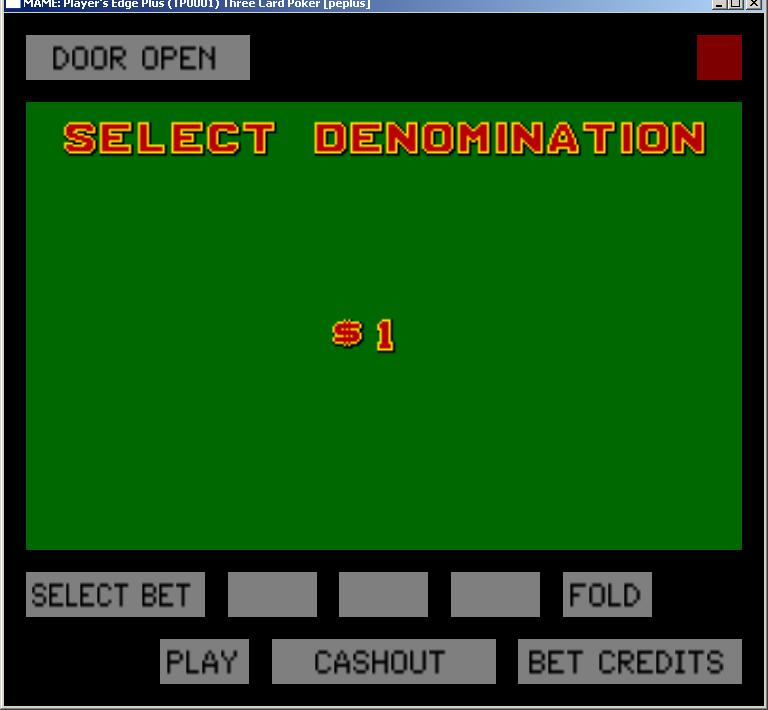
Looks like my MAME adventure has changed course slightly for the time being. After learning so much about the PE+ hardware and emulating it, I decided to try my hand at creating a new romset for this platform from scratch!

The results so far are the many pictures posted here. I decided to create a game that is not currently found on this platform, and chose to go with a 3-card poker game.

The rules of the game are fairly straight-forward. You and the dealer are dealt 3 cards each and you must obtain a higher hand than the dealer. It is classic stud poker, where you don't discard and draw.

Besides the normal "ante" wager. You can place a bonus wager on the final value of your hand dealt. This "Pair Plus" wager pays even if you end up losing the hand. The bonus wager only pays if your hand is a pair or better. A paytable determines the payout for each of the bonus hands.

Once you receive your hand you can decide to either play or fold. If you play, you must place a second wager that matches your original ante. If you fold, you lose your ante wager, but can still receive your bonus payoff if you have a pair or better.

If you decide to play, the dealers cards are revealed and you are paid even money for your ante wager if you have a higher hand than the dealer. If the dealer hand qualifies (Queen high or better), your play wager also pays even money, otherwise its a push. If a tie occurs, you push both bets.

I'm developing the application using SDCC and compiling for the i8052 platform. Once compiled I convert the .HEX file to a .BIN file and test it under MAME. So far I have the video, inputs and sound mostly working. Its interesting to code from the other side of the platform. Things as simple as random number generators (which is done), etc. can be a pain to figure out, but once I am done, I will have a solid SDK for building other games.

I have been trying to create a game in the same style as IGT and therefore I have been adding support for the multiple operator screens that are used to setup the machine.

I will eventually burn the game onto a chip and test it in my real machine. But I want to make sure I have most of the bugs worked out first in MAME. Burning chips and disassembling the machine to pop in the chip takes too much time, but will need to be done sometime in the future to make sure I didn't miss something in the code (like the watchdog timer which the MAME driver ignores).

There is still plenty of code required to finish the game, but I am learning a lot about this machine as I go. And I currently have a lot of useful code for my PE+ SDK.